SnowFit
Gym Fee Collection: Track UPI, Cash and Dues

The cash drawer says ₹3,500. The register says ₹4,200 came in today. Somewhere in the owner's GPay there's a ₹700 transfer that might explain the gap, or might be from last week. If that's how your closing time goes, the problem isn't your staff. It's that UPI, cash and part payments all land in different places, and gym fee collection only works when they end up in one. This guide covers where the confusion comes from, then shows step by step how we handle UPI, cash, instalments, dues, refunds and write-offs in SnowFit.
Why is gym fee collection so confusing in India?
Gym fee collection gets confusing because the money arrives in too many ways at once. A member pays on UPI to the owner's phone, another pays cash at the desk, a third pays half now and half on salary day, and none of it is written in the same place. By the end of the month, nobody can say for sure who still owes what.
These are the situations we hear about most from gym owners:
- UPI goes to one person's phone. The payment lands in the owner's personal account. The trainer at the desk can't see it, so the member is asked for the fee again the next morning.
- The cash drawer doesn't match the register. ₹500 short at closing time, and no way to tell whether someone forgot to write a payment down or gave the wrong change.
- "I'll pay the rest on the 1st." Part payments are agreed at the counter and remembered by nobody. Three months later, ₹2,000 is still pending and the member has forgotten too.
- Screenshots as proof. A member shows a GPay screenshot from his phone. You can't tell quickly whether it's for this month or last month, or whether it's already been counted.
- Half cash, half UPI. ₹1,000 in notes and ₹1,000 on PhonePe for one plan. In a notebook that becomes two lines, or one line with the wrong amount.
- Dues from members who have left. A member stops coming with ₹3,000 unpaid. That amount stays in your "pending" total for a year and makes every month look better than it was.
| The problem | What it costs you | What fixes it |
|---|---|---|
| UPI on a personal phone | Members asked twice, awkward desk moments | Record every payment against the member's bill |
| Cash not matching | Lost money, mistrust between staff | A list of the day's cash payments to count against |
| Forgotten part payments | Money that's never collected | Instalments with dates, visible to everyone |
| Screenshot disputes | Time and arguments at the desk | A receipt with a payment ID for every rupee |
| Old dues of members who left | A wrong picture of your business | Writing off what won't come back |
How do you track UPI and cash payments at a gym?
To track UPI and cash payments at a gym, record every payment against the member's bill at the moment you receive it, with the method and the amount. Then check one list at the end of the day: the cash payments against the drawer, and the UPI payments against your bank app. When each rupee is tied to a bill, nobody has to remember anything.
That's the whole idea. The steps below show how it works in SnowFit, using a real bill from start to finish: a ₹4,000 quarterly plan, paid in three parts. (If you're still comparing tools, we wrote about the best gym management software in India.)
Step 1: Create the bill from the plan
Open the member's profile, go to Membership and tap Buy plan. The New bill window opens with every plan you've set up, each with its price, validity and access hours.
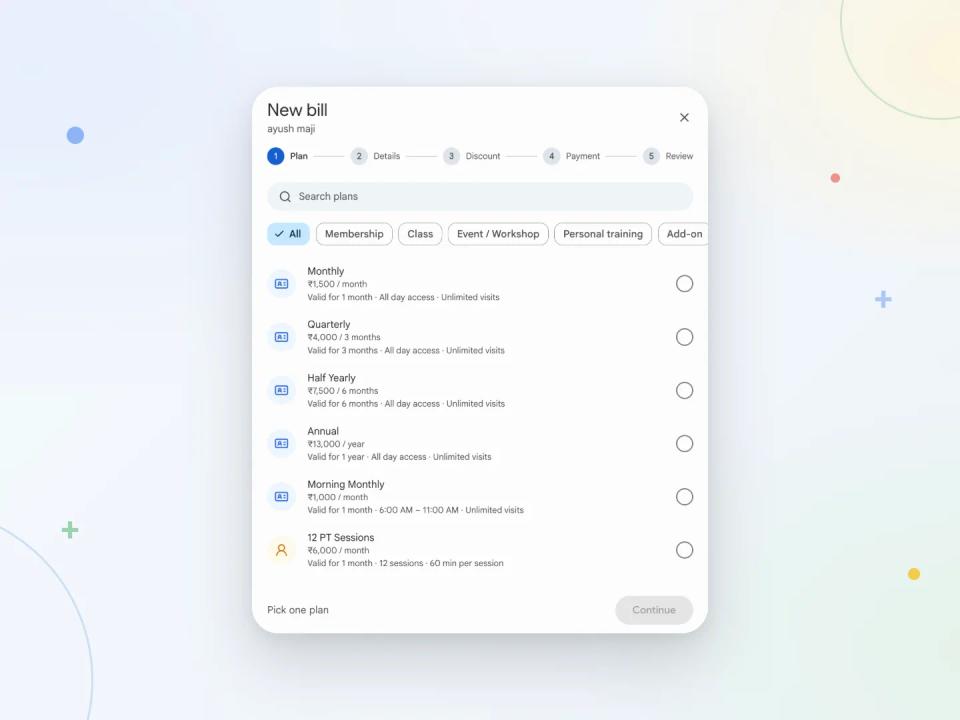
Because the price comes from the plan, the desk doesn't type amounts by hand. Nobody charges ₹3,500 for a ₹4,000 plan because they misremembered the rate. You can still add a coupon or an owner discount on the next screen if you've agreed one.
Step 2: Split the fee into instalments if they can't pay in full
At the Payment step, choose Pay in full or Instalments. Instalments lets you split the bill into 2 to 6 payments. SnowFit fills in the dates and divides the amount, and you can change either.
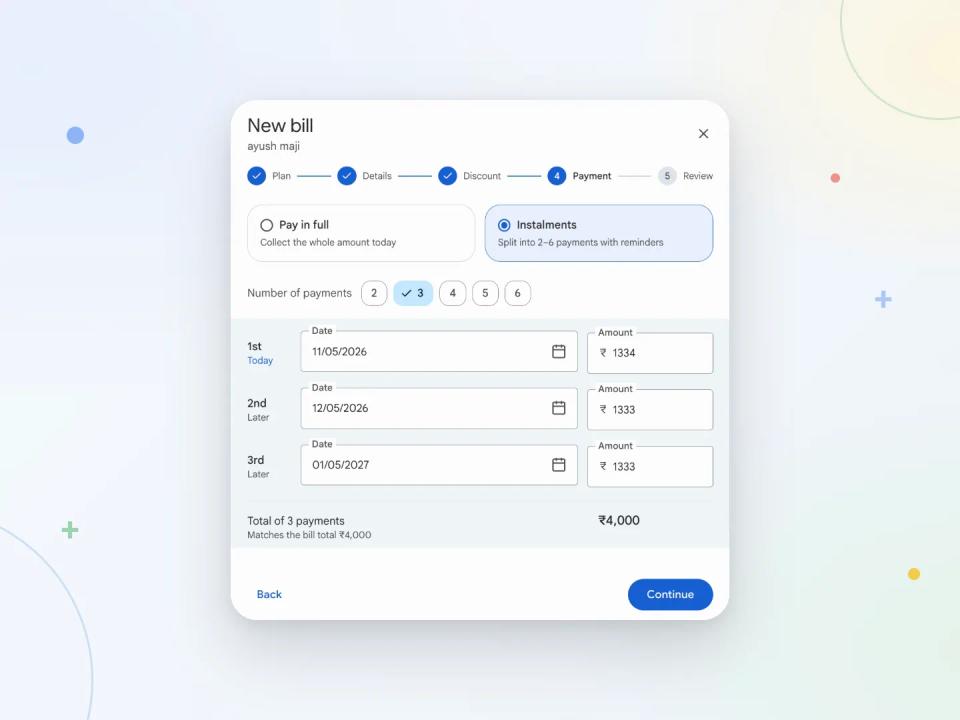
Here the ₹4,000 becomes ₹1,334 today and ₹1,333 on each of the next two due dates. The total at the bottom always has to match the bill, so you can't accidentally agree to ₹3,800.
This is the step that replaces "I'll pay the rest on the 1st". The promise is now written down, with a date, where anyone at the desk can see it. If you're opening a new gym, decide your instalment rules before day one; we covered plan pricing in how to start a gym in India.
Step 3: Record how they paid, even if it's UPI and cash together
On the Review step, pick how the money came in: UPI, cash or another method. If the member pays part of it each way, add a second method and enter both amounts.
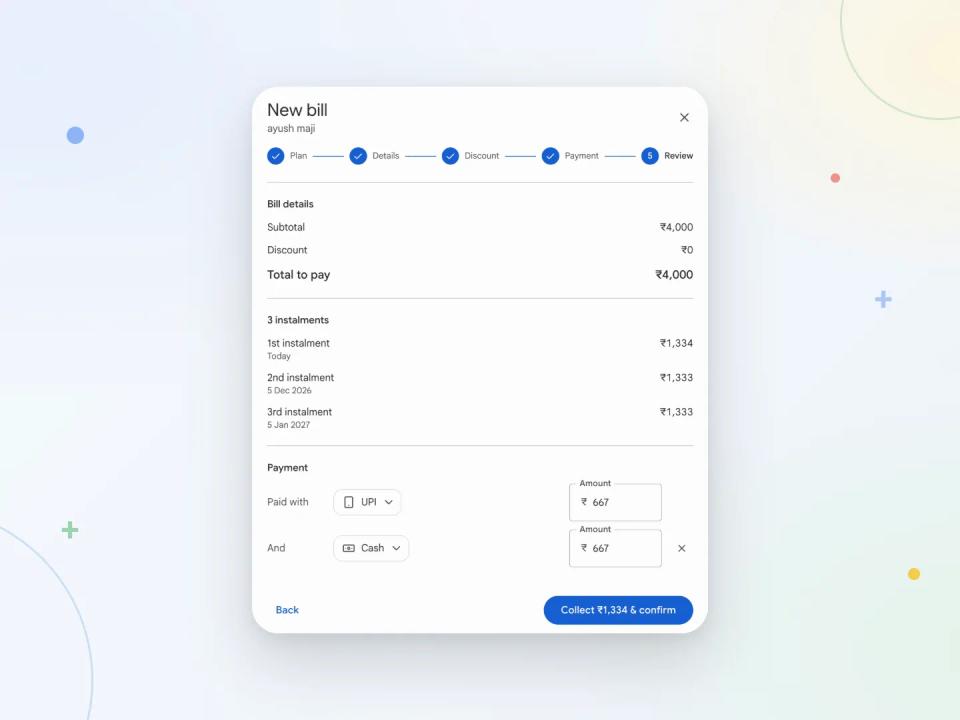
In this example the first instalment of ₹1,334 came in as ₹667 on UPI and ₹667 in cash. Tap Collect ₹1,334 & confirm and both are saved as separate payments on one bill.
Step 4: Share the invoice with what's paid and what's left
The bill is created straight away. This is the invoice the member gets, exactly as SnowFit prints it: the plan and its dates, the total, the amount paid and the balance due. It's marked Partly paid until the last instalment comes in.
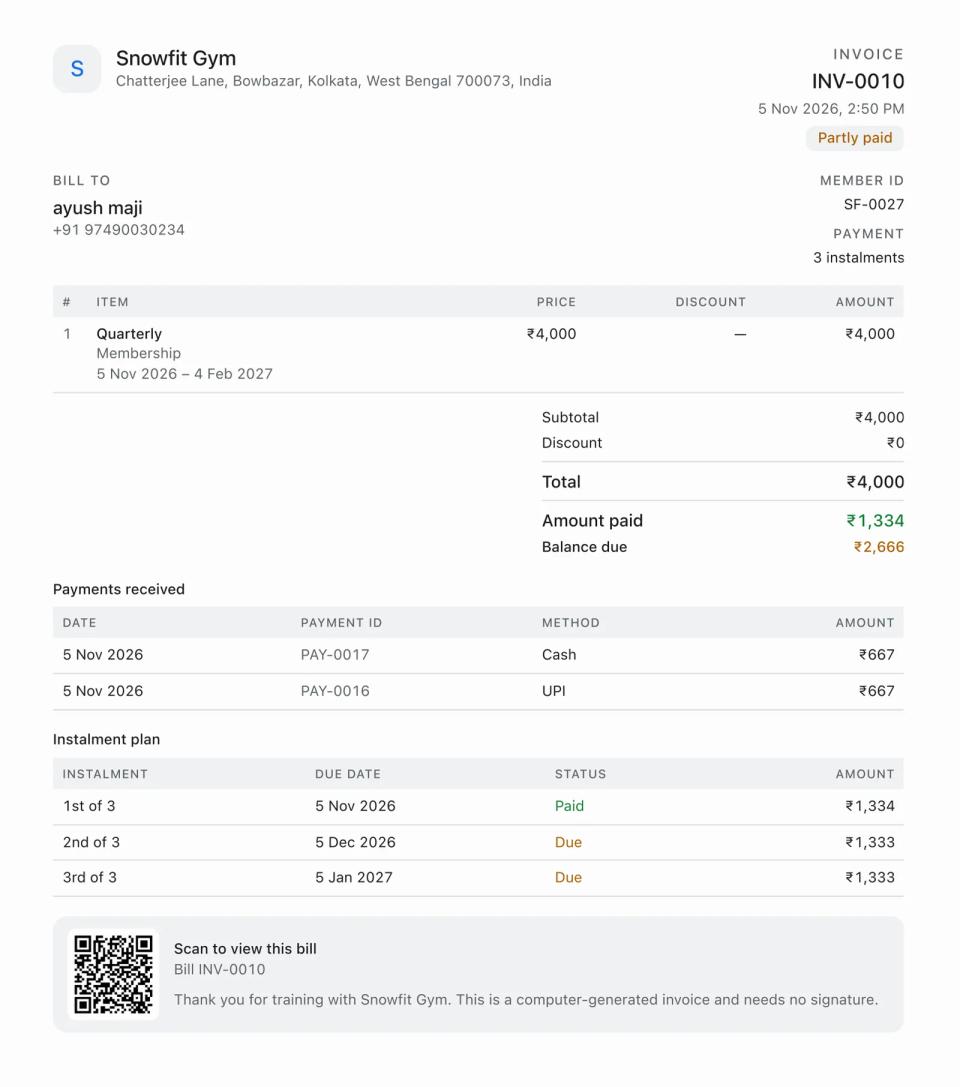
Below the totals, it lists every payment received with its own payment ID and method (PAY-0017 in cash and PAY-0016 on UPI here), then the full instalment plan with the status of each one. At the bottom there's a QR code the member can scan to view the bill online. From the bill window you can Print it or save it as a PDF.
This is what ends the screenshot arguments. When a member says "I paid last week", the invoice shows the date, the method and the ID of every payment.
Step 5: See the due on the member's profile
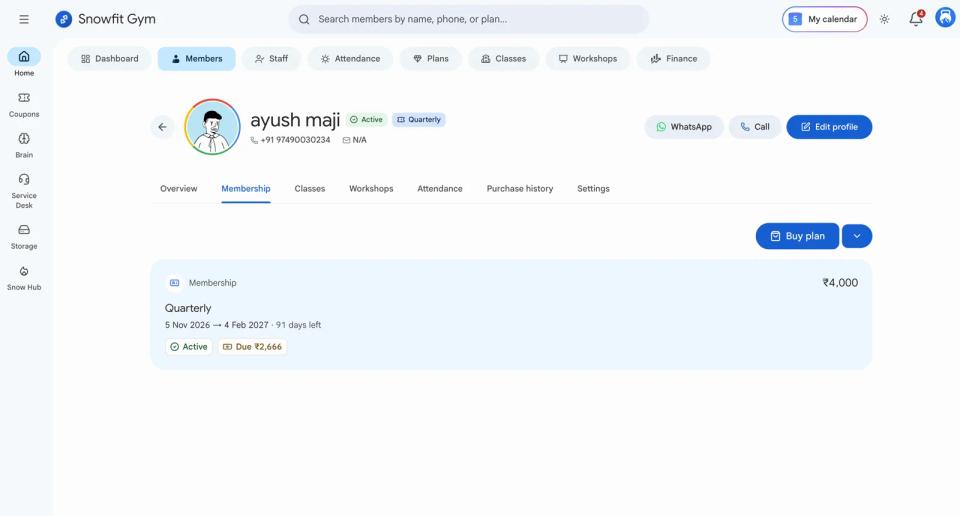
Back on the member's profile, the membership card now shows Active and Due ₹2,666. Anyone who opens this member, whether that's you, the morning trainer or the evening receptionist, sees the same number.
Step 6: Close the day in Finance
The Finance page is where the day comes together. Pick Today, This week, This month or a custom range, and the four cards at the top show sales, what's been collected, what's still due and what's overdue.
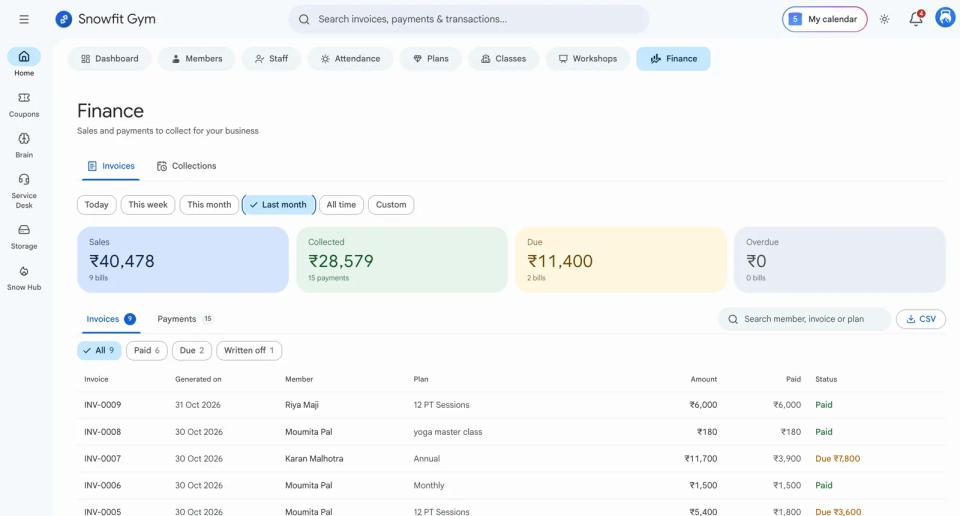
Below the cards, Invoices lists every bill with its status (Paid, Due or Written off), and Payments lists every payment with its method.
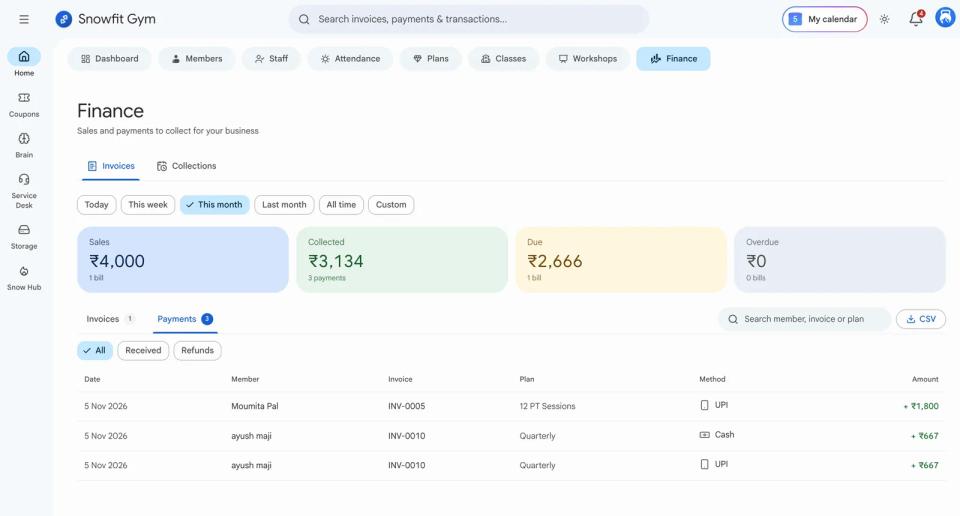
This is the ten-minute closing routine that stops the cash drawer arguments:
- Open Finance → Payments → Today.
- Add up the Cash rows and count the drawer. They should match. If they don't, you know exactly which payments to ask about.
- Check the UPI rows against your bank or UPI app. Each one should be there.
- Download the CSV at the end of the month for your accountant.
Step 7: Collect the next instalment on the day it's due
The Collections tab shows every instalment still to come, sorted by due date and grouped by month. Each row has the member, the plan, the invoice, which EMI it is (for example "EMI 2 of 3"), the amount, and how many days are left.
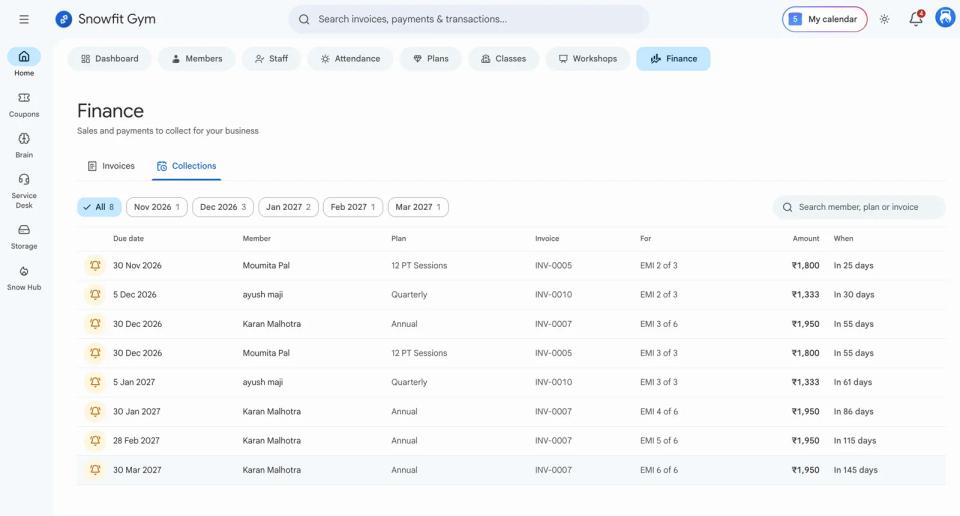
When the member comes in, open their bill and tap Collect. The next instalment amount is already filled in. Pick UPI or cash, or tap Split across two methods if they pay both ways.
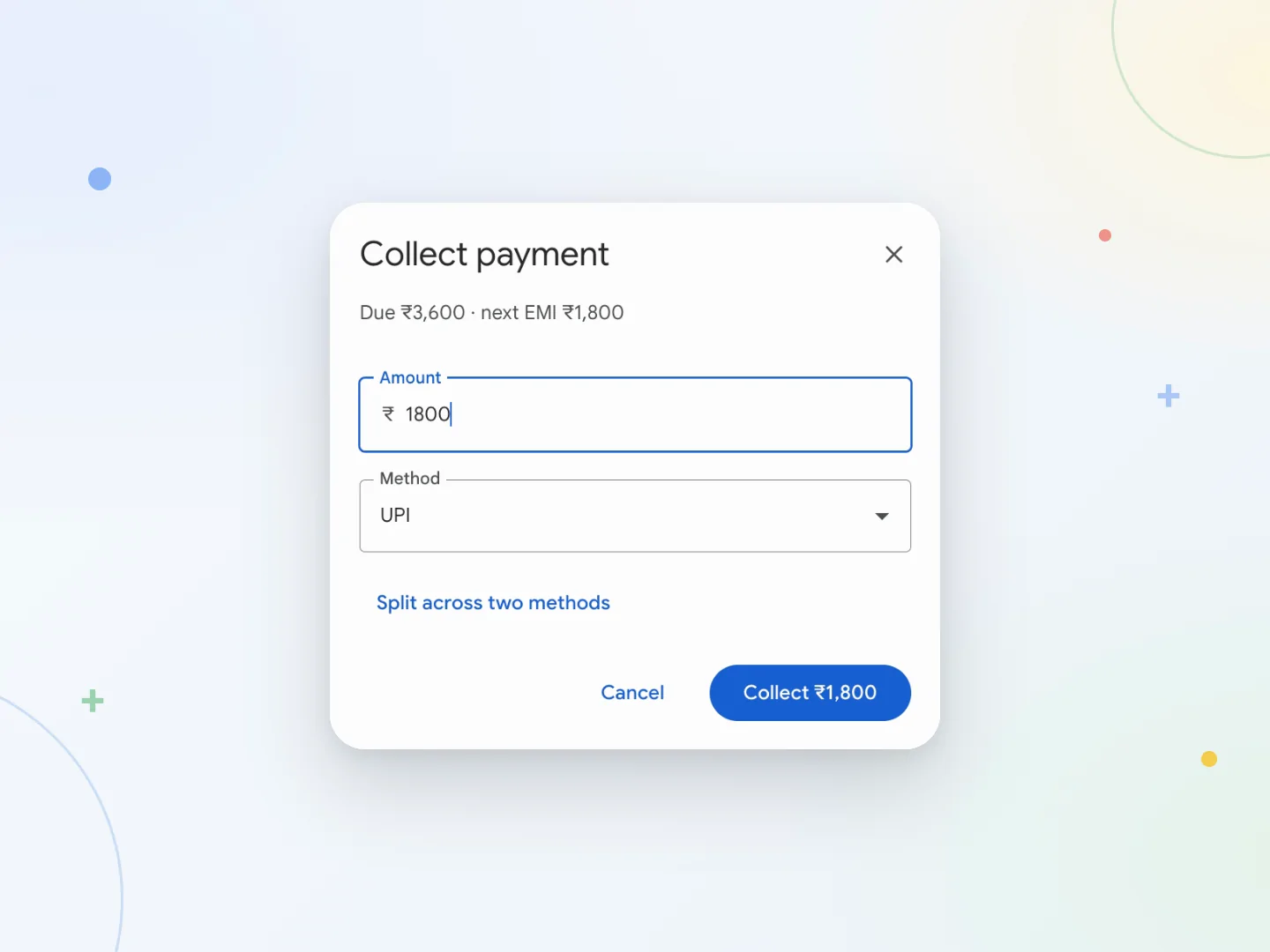
The invoice, the member's due and the Finance totals all update at once. You don't need to cross anything out anywhere.
Step 8: Write off dues that won't be paid (or keep them)
Some dues won't come back. A member moves to another city, or stops coming and stops answering. Keeping that money in your "due" total doesn't help you; it just makes your numbers look healthier than they are.
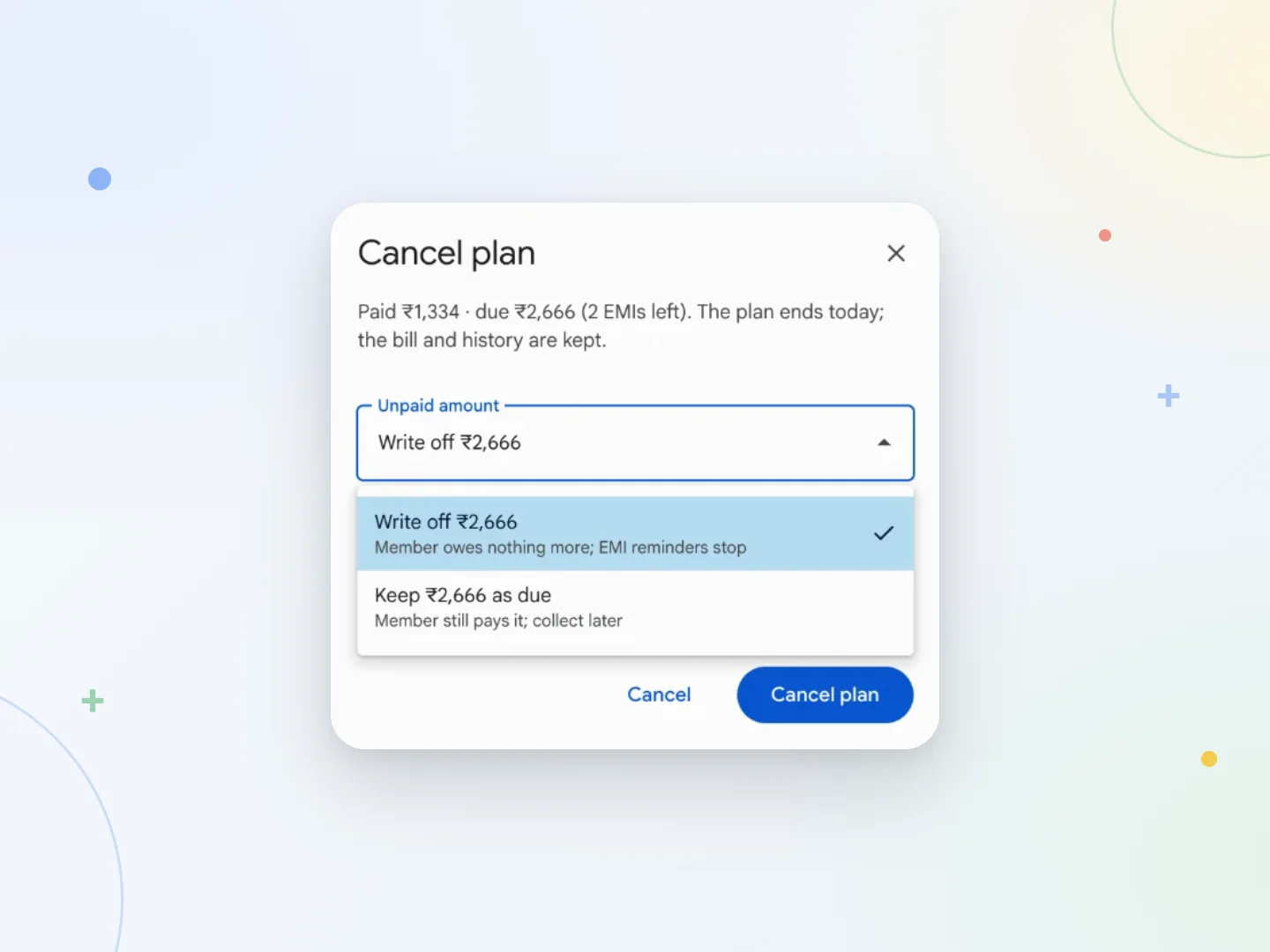
Writing off a due means you accept that the balance won't be collected and take it out of what you expect to receive. In SnowFit you do this when you cancel the plan. Open the member's bill, tap the ⋮ menu and choose Cancel plan. SnowFit tells you what's been paid and what's still due, and reminds you that the plan ends today but the bill and its history are kept.
Then you decide what happens to the unpaid amount:
- Write it off. The member owes nothing more, and the EMI reminders stop.
- Keep it as due: the plan ends, but the member still owes the balance and you can collect it later.
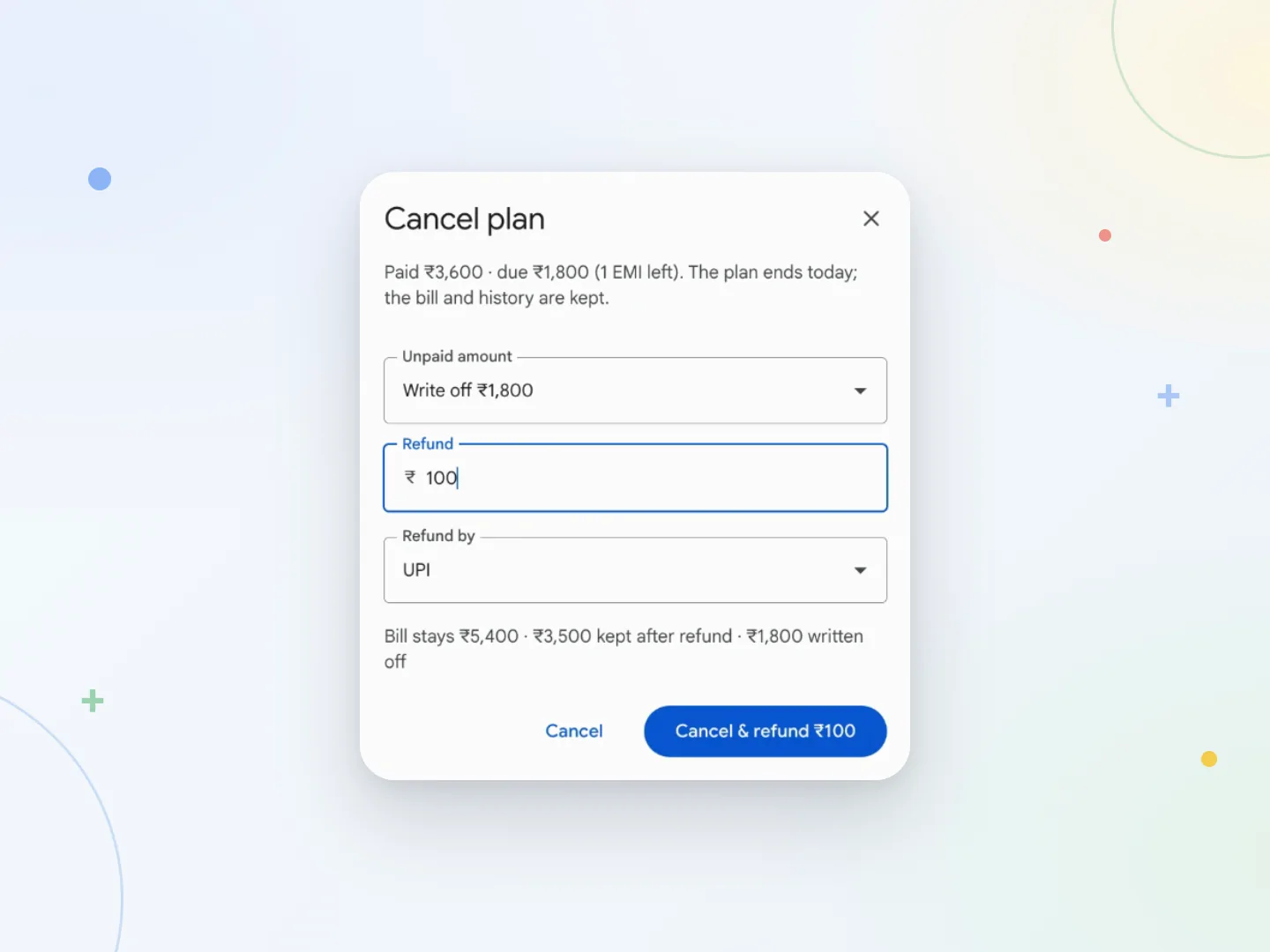
If you're giving some money back, enter it in Refund and pick how you're refunding it, UPI or cash. Before you confirm, SnowFit spells out the result in one line. In Moumita's case: the bill stays ₹5,400, ₹3,500 is kept after a ₹100 refund, and ₹1,800 is written off.
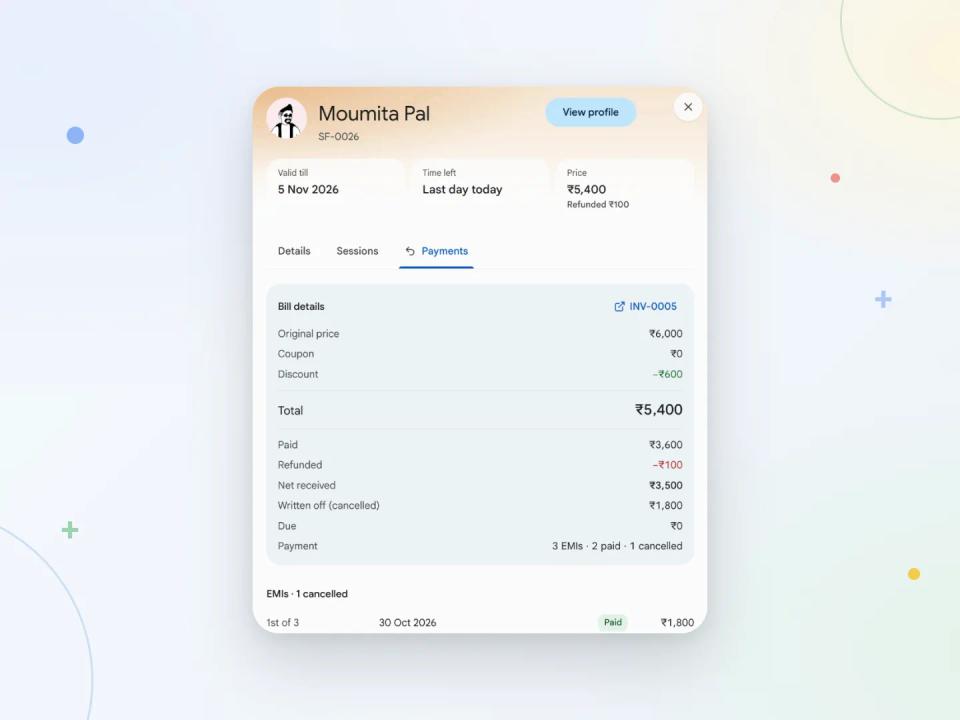
After you tap Cancel & refund, the bill shows every part of the story: paid ₹3,600, refunded ₹100, net received ₹3,500, written off ₹1,800, and nothing left due. The refund appears in Finance → Payments as a minus line with its method, under the Refunds filter, and the bill moves under Written off in Invoices. Your Due card now only shows money you're still actually chasing.
Write off sparingly. Give the member a reminder and a call first, and set yourself a rule, for example "no payment and no visit for 60 days". A clear rule stops the decision from depending on who's at the desk that day. And if the member might still pay, choose Keep as due instead; you can always write it off later.
What should you stop doing?
A few habits keep the confusion going even after you start recording payments properly:
- Taking UPI on a personal number "just this once". If it must go to a personal account, record it as UPI on the bill before the member leaves the counter.
- Writing payments on paper to "enter later". Later usually means never, or with the wrong amount.
- Letting members pay "something" without a plan. ₹500 here and ₹1,000 there with no instalment plan behind it is how ₹2,000 dues are born.
- Discounting at the counter without recording it. Use the coupon or owner discount on the bill, so the invoice and your sales numbers tell the truth.
Frequently asked questions
How do I track cash and UPI payments at my gym?
Record each payment against the member's bill as soon as you receive it, with the method and amount. At closing time, compare the day's cash payments with the drawer and the UPI payments with your bank app. Gym software like SnowFit keeps this list for you.
Can a member pay part of the fee in cash and part on UPI?
In SnowFit you can split one payment across two methods, for example ₹667 on UPI and ₹667 in cash. Both are saved on the same bill and appear separately in your payments list.
How do I manage gym members who pay fees in instalments?
Set up the instalments when you create the bill, with a date and amount for each one. You can then see every upcoming instalment in one list and collect each one on its due date, instead of relying on memory.
What does it mean to write off a gym due?
Writing off a due means accepting that a member's unpaid balance won't be collected and removing it from the money you expect to receive. In SnowFit you write it off when you cancel the plan, and the bill keeps the full history. Do it only after reminders and a fixed waiting period.
Is there free software to track gym fees in India?
SnowFit is free to use for Indian gyms and studios. It covers bills, instalments, UPI and cash payments, invoices, dues and the Finance page described above. See free gym management software for what's included.
The bottom line
Pick one rule and start tomorrow: no payment leaves the counter without being recorded against a bill. Do the ten-minute Finance check at closing for a week, and you'll know where every rupee went. If you'd rather not chase dues by hand either, our post on 5 gym automations that save you 5 hours every week shows how SnowFit sends due reminders on WhatsApp. Start using SnowFit free.